Category: All Posts

Values

I recently came across the company AES.  I don’t know much about them, but I was very impressed by their values.  I wish more would emulate them!  Most impressive they appear to actually live by them as well!

Fairness – We work with people in a way that’s fair and just. AES people intend to treat fairly our customers, suppliers, stockholders, governments, the communities in which AES operates, and other AES people.

Integrity – AES people strive to act with integrity. Our people accept responsibility for their actions, and are expected to act with integrity in all circumstances. They honor their commitments to customers, to partners, and to the shareholders who make the company’s efforts possible. They develop or access the right knowledge and skills to make informed, balanced decisions that advance the interests of the entire enterprise.

Social Responsibility – AES people strive in all cases to act in a socially responsible manner and believe that working to fulfill AES’s mission is one of the important ways to do this. In addition, we are committed to being involved and constributing corporate citizens in the communities we serve.

Fun – AES people desire that fellow employees and those with …

Presenting from my Treo

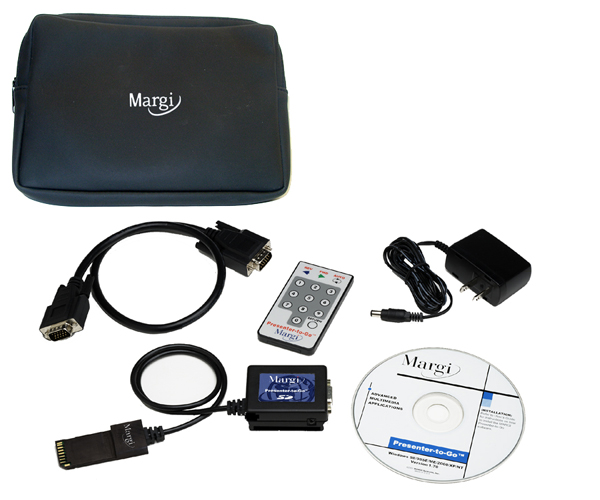
I will be getting a Treo 650 in 2 weeks time,  I already have a personal 600,  but this one will be provided by my company and will have wireless email, calendar and address book.  I am really looking forward to it.  I will also get to play with a Margi presenter-to-go kit, which should be fun,  I have never been convinced of the benefits of presenting from a PDA, but it will be interesting to experiment.

One of the reasons I have always liked wireless email is that I always forget to sync my PDA’s, the only one that was ever up to date was my Backberry and it was never in its cradle and the only time it synced to the PC was during a SW upgrade.

Great utilities site

I recently refreshed my utilities by browsing through Scott’s great site strongly recommened.  These are the ones I use:

  • Notepad2 (Scite also uses the codebase) – A great text editor. First class CR/LF support, ANSI to Unicode switching, whitespace and line ending graphics and Mouse Wheel Zooming. A must. Here’s how to completely replace notepad.exe. Personally I renamed Notepad2.exe to “n.exe” which saves me a few dozen “otepad”s a day. Here’s how to have Notepad2 be your View Source Editor. Here’s how to add Notepad2 to the Explorer context menu.
  • Windows Desktop Search – The betas were rough and tended to lock up, but the free final edition is tight. I can finally bring up a file almost as fast as I can think about it. One important note that sets it apart from Google Desktop Search is that the items appearing in the result window are first-class Explorer Items. Right click on them and you’ll not only have all your context menu extensions, but also Open Containing Folder.
  • TaskSwitchXP and/or TopDesk – Two better ways to ALT-Tab and Task Switch in Windows. Don’t confuse TaskSwitchXP with the old PowerToy. This one is fast and powerful. …

Microsoft’s new XML formats, the power of the container model

XmlIn this post I explained that I, along with a few thousand others, was pretty excited about Microsoft’s XML format developments.  I also pointed to Brian Jone’s blog which is proving to be a great recourse.  At Tech ED Brian gave some demonstrations showing the power of the new format, stressing the benefits of the ZIP container format and the fact that different parts of a document are represented as different objects in the ZIP container.  Read for yourself,  or read on and see some of the examples which are pretty cool.

    1. Updating a diagram in a spec: I showed an example of taking a technical spec with an old diagram, and outside of Word I swapped it out with a more up to date one. The main purpose of this wasn’t to show that an end user would do that to their files, but instead to show that people could easily build solutions that push relevant pieces of content into files.
    2. Removing comments: Most people that manage collections of documents or deal with publishing documents have seen the problem that can occur with extra information in their files. I took an example of a whitepaper with a bunch …

One less Portal

Brian Madden reports that CITRIX have demonstrated a web part that provides integration between SharePoint and Presentation Server.  It sounds pretty good:

One of the most exciting things I saw at Citrix iForum Edinburgh this year was a demo of a SharePoint web part from Citrix that will allow a SharePoint site to act as a web interface into Presentation Server farms. (This is called “WISP” for “Web Interface for SharePoint.”) Using WISP will be much simplier than trying to strip down the existing Web Interface to stick into a generic SharePoint HTML web part.

Citrix is making the WISP functionality available as a standard SharePoint web part. WISP will be composed of two pieces:

The first will contain an application area and a session control panel area that will hold the icons for applications that users can click on as well as basic workspace control options (Reconnect all, disconnect all, and logout).

The piece is an extension to the standard Microsoft document library web part. (The document library web part is a web part that displays files and documents stored on a SharePoint server.) Citrix has extended this web part so that it allows documents to be opened in remote Presentation …

Interesting statistics on paper usage

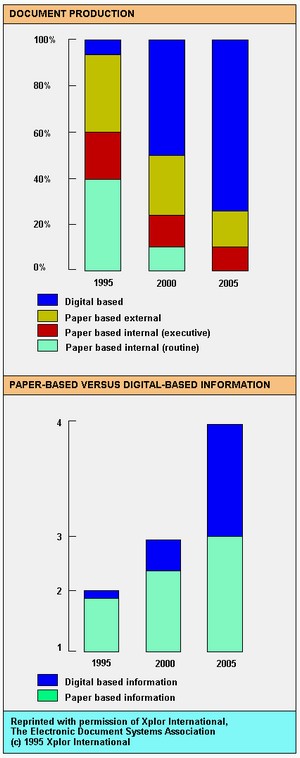
XPLORI posted a while ago about my quest to go paper-less, its going very well btw although I find it’s becoming a bit of an obsession :-(.  Anyway I recently came across this interesting article and trend graph. 

I also got an email from Milton, who had read my post on going paper-less.  Milton has a blog where he talks about paper-less office ideas and articles and even better he has written and eBook on the subject that he sells on his site.  He has been kind enough to send me a copy to read, so I will report back on that soon.

Office 12 new XML formats

XmlThis is big news and widely reported, and live on video.  I am increasingly impressed around the evolution of Office,  I think Microsoft is finally realising that people don’t want more incremental functions to refine what they already do.  They want new way of working to be enabled.  The new features in 12 seem to be going in that direction at least in the collaboration and information management areas, I can’t wait to see what they do when they can build on top of Longhorn and WinFS.  That’s not to say that OOo is not doing some great creative stuff as well, and of course the killer value proposition of OOo will be its ubiquity as within 3 years I doubt there will be a corporate desktop anywhere that does not have access to OOo,  I don’t think we will be able to say that about office 12, so Microsoft needs to get creative, Metro is the first glimmer of that, we will have to wait and see!

One of the best places to keep informed seems to be Brian Jone’s blog, a bit about Brian:

Brian is a program manager on the Word team. He’s been at Microsoft for …

Microsoft starts to open up

InteroperabilityMicrosoft and Sun put on a nice show recently to demonstrate that competitors can still work together to improve interoperability for the benefit of their customers, this follows a couple of years of real progress by Microsoft in working out (with partners and competitors again) an architectural approach (web services) that allows them to innovate but inter-operate.  Of course the Open Source world has been showing the way on that for years, so its nothing new, but it’s certainly an encouraging move by Microsoft.  This last report on their approaches to Red Hat CEO Matt Szulik and more recently Michael Tiemann, president of the Open Source Initiative and vice president of open-source affairs at Red Hat is further evidence.  Certainly in my discussions with Microsoft I am detecting an increasing awareness of the real world that customers live in,  rather than the ideal world (in their eyes) that Microsoft would like us to be in, progress, slow but sure.

War rooms increase productivity

FlexibleofficeSome of the best years of my working life were spent in an office environment I designed to promote collaborative work.  It had many of the characteristics of a “war room”.  With quiet areas around the sides, tables in the middle and loads of break-out areas, white-boards, flip charts and a design review/presentation area.  I described this environment in a previous post.  I have generally been frustrated at the lack of discussion about workspace design in the IT press, so I was pleased to come across this article that resonated strongly with my experience:

Recently, many companies in the software industry have been experimenting with putting teams of workers into “war rooms” to enhance communication and promote intense collaboration, explains Stephanie Teasley, an assistant research scientist in the U-M School of Information’s Collaboratory for Research on Electronic Work.

Instead of toiling in separate cubicles, workers sit at wall-less workstations in one big, open room. The room is typically outfitted with central worktables, whiteboards and flip charts to facilitate group discussions. While companies expect benefits from such arrangements, workers sometimes balk at the idea, fearing they’ll sacrifice privacy and the quiet they need to concentrate on demanding tasks. The U-M …

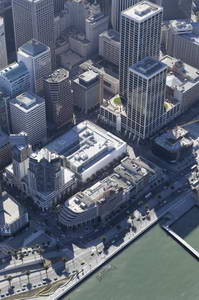
Microsoft Virtual Earth and integration

Msn_veThis video shows some great integration between different information sources:

  • Satellite imagery
  • Low flying aircraft imagery
  • Vector mapping data
  • Local “yellow pages” type information

You can take this integrated data and share it as:

  • Directions
  • Blog posts to MSN Spaces

And they implied that a Win32/.net client is under development and you can image the sort of integration that that will have with GPS, Outlook etc.

Of course google maps has some similar features, what’s will be interesting about Virtual Earth is the integration and the thick client possibilities.