Tagged: Productivity

I don’t have time for video!

As usual Jon Udell has a very insightful article about the need to media-shift, in his case from video to audio.  I have the same problem.  When I am at a computer I only really have time to work, watching videos is too distracting so they tend to get neglected.  This is particularly the case when I have a DVD full to watch from a conference, for example I have still not got through all of the videos from the last PDC.  Anyway I came across a useful utility today, Sermonex, that monitors my “To Watch” folder and automatically strips the audio from a WMV file, providing me with a WMA file, perfect for downloading and listening to on my Treo.  I did this once before using SoundRecorder but it was a bit of a pain, this way it just happens automatically in the background.

The business case for wireless PDAs and Smart Phones

ImateYesterday I was working on the business case for wireless PDAs and Smart Phones for my companies senior exec’s, probably VPs and above.  I found it pretty enlightening.  I am not going to share the business case, but I did have a few interesting observations to share:
  • The incredible ROI you get if you can allow and executive to release time during the core working day, by using otherwise unproductive time to process emails.  (the business case identified may more benefits)
  • The risks that a always on device brings in terms of Work Life Balance
  • The risks that information overload and constant interrupts can have on mental health.

Whilst I think there is a good business case I included this caution after presenting the ROI:

However, there are some cautions that also apply to the analysis:

  • It will take several weeks for executives to attain the levels of improvement described and for an effective usage culture to develop
  • The case partially depends on the availability of otherwise “unproductive time”
  • Whilst such time exists, there are alternative uses for this time for example networking before meetings, making phone calls, thinking etc.  These activities may have as much or greater value.  The spreadsheet …

HotRecorder, Skype and My Life Bits

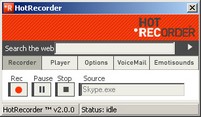
HotrecorderInspired by listening to talks about the Microsoft Research project, My Life Bits, I decided it would be a good idea to record my telephone conversations when I can. Fortunately it turns out to be really easy if you use Skype and the free program HotRecorder.  The product is not the prettiest I have ever used, and the UI is a bit quirky but it gets the job done.  Recording quality is good, and you can add key words and the name of the person you called to each recording making retrieval easy.  The ad-supported version is free and the premium version is only $14.95.  Well worth trying out, if only to listen to the different responses you get when you tell people you are recording the call, from the slightly guarded/worried to the “where can I get a copy”, so far!

If you want to get up-to speed on My Life Bits I recommend the recording on IT conversations, which I listened to on my Treo while walking along the beach last week.

My Life Bits progress so far:

  • Photo’s
  • Emails
  • Web pages
  • Documents read
  • Documents reviewed
  • Audio listened to
  • Contacts talked to, or want to talk …

How Skype has changed the way I do voice communication

OutlookskypeI have been pretty pleased with Skype so far.  Here is a snapshot of how I use voice communications now:

At my home office:

  • when I get home I put my mobile (Treo 600) in its cradle and this initiates an automatic auto-forward to my SkypeIn number, which also comes with free voicemail.Microphone
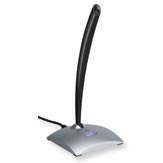
  • at my desk I am using my Logitech noise cancelling USB Microphone and my desktops speakers, people tell me the quality is very good – so there is no need to mess around with headphones
  • I have contacted about 30 people who I often call to try and get them using Skype,  about 20 of them have installed it.  For these people Skype to Skype calls have been very successful.
  • I still have quite a lot of people that I contact who are not using Skype, mainly because they are highly mobile so for these people I have been experimenting with SkypeOut.  The quality of SkypeOut does not seem as good as Skype to Skype, but it seems good enough in most cases.  I have suffered a few dropouts when calling mobiles (UK –> Australia) but this may have happened anyway.  The call charges were much less …

Experiments with Skype

SkypeAfter an initial abortive attempt at using Skype I started to use it again yesterday with impressive results. Certainly BT to BT calls seem excellent, BT to cable was where I had the problems last time I tried. In fact I was so impressed that I purchased a SkypeIn number and unlimited voicemail for £24 for 12 months, which is a lot cheaper and more flexible than installing a business line. I then setup my Treo so that when I am at home all of my calls are automatically forwarded to my SkypeIn number and hence to my main desktop. When I leave home all calls revert to my Treo.

Anyone wanting to test out the quality – if you know me – ring my mobile on Wednesday; chances are it will divert you to my SkypeIn number, even better get Skype yourself!

If it all works as expected then my wife will be pleased because I won’t be hogging the home telephone line, and it’s much easier working with my microphone and PC speakers than with a conventional phone/speakerphone. I need to test it later on my Tablet over wireless so that I keep my home mobility.

Whilst investigating …

The pyramid principle

PyramidI used to be one of those “everything on my laptop” sort of guys until I started working from home.  Now I use the device pyramid principle, which is another way of saying that I exploit the strengths of 3 devices to offset the weaknesses of those same three devices.  I works like this:


600C_127dialpad_medMy least powerful, but most accessible device is my Treo.  I can access anything on it with a couple of clicks, and its up and running in a second (actually its always on but it takes a second to activate the screen).  Because it’s my phone I never leave home without it.  The information I carry on it is the basic stuff:


  • Contacts
  • Diary
  • Email
  • Todo
  • eWallet

But because it’s always with me it’s important that I also have stuff for entertainment, (music, books) and work to fill in any otherwise dead time (RSS feeds, tech conferences, email).

Tc1000Next comes my Tablet,  it’s much bigger, takes a couple of minutes to get going, and even longer to find what I am looking for.  However being more powerful it has everything that the Treo has plus:

  • All my scanned documents
  • All my current work
  • Everything …

New workstation design!

DeskI have gradually refined my workstation design, and its changed quite a lot since the last time I posted.  So I thought I would provide an update.  This first image shows an overview of the whole environment, there are some key points to look out for:

  • First I two PC’s shown at the bottom, the one on the left is my desktop, running Windows 2003 Server, with 2GB of memory and VM Ware Workstation and all of my other applications.  This PC drives the three monitors via two ATI graphics boards.

Behind the PC’s in a curtain that my wife made for me that hides one hell of tangle of cables!

On top of the centre monitor is a USB web cam.  On the CRT monitor is my headphone jack and volume control and my Secure ID token (dual factor authentication) for my company VPN connection.

The two monitors centre and left are 19” TFT’s that run at 1280*1024.  The one on the right is a 19” Flat CRT.   I tend to use the one of the left for email, reference materials, instant message discussions etc.  The one in the middle for writing, presentations and reading, and the one …

Ok, yes I did buy a Treo!

600C_127dialpad_medOnly a few weeks ago I sold my old Pocket PC,  a fairly new Ipaq 4150 and an old Creative Zen MP3 Player.  I got about £450 for the whole lot and included quite a few bits of software and other bits like headphones and stuff I had acquired as free gifts along the way.  I wanted to de-clutter my life and was looking to free up enough money to upgrade my TC1000 Tablet to a TC1100.  Well browsing through eBay I saw a Treo 600 which I though was a great bargain,  for less than £200 I got the Treo, headphones that also work as a headset, and all sorts of other bits and pieces including a 1GB SD card. 

It arrived today and so far I am very happy, here are a few of the reasons why:

  • Great phone, good media player, great Lotus Notes integration, the touch sensitive screen is easy to use with my small fingers, so I hardly need the stylus.  Replaces everything I sold in one device and adds a phone into the bargain.

I made a few upgrades:

  • Using an existing licence for mNotes that I had purchased to sync with my Ipaq …

The business case for portable computers

Just recently I read a blog post (which I can no longer find) that cast doubt on the business case for portable computers.  The basic argument went like this:

  • Portable users worked for 14% more hours
  • Portable users produced 13% more work
  • Therefore portable users were 1% less efficient

Assuming I remember this correctly it seems a pretty strange analysis, so here is my counter analysis.  First the case for portables and productivity:

  • Portable users do more hours when they have a portable device because it allows them to work when they would otherwise be undertaking some leisure activity, depending on the portable device in questions, these times are most often, whilst waiting in airports, travelling by train, sitting in front of the TV etc.
  • Portable users do more hours because its easier to “just spend an hour” working at the weekend, than it is to drive to work and do it there
  • Portable users spend more time with access to time critical information sources, email, IM etc and so respond faster reducing lead-times, and improving decision making
  • Portable users make better use of their time in the office, processing email, expenses and other low low importance high volume tasks tend to …

Paperless, the enduring dream of computing

I remember writing my first “paper reduction” based business case about 15 years ago, and using the “paperless office” phrase in a business case for the first time about a decade ago, it’s interesting to see how much “progress” we have made.  It seems that the average office worker in the USA now consumes over 12,000 sheets of paper per year!  In cost terms that’s probably well in excess of $500 a year. 

Last year I had the opportunity question my own usage of paper and was staggered by the extent to which I depended on it.  I also came across an interesting article that discussed why no one seems interested in solving the problem which I discussed in my blog last year

However I am now able to say that I live an almost paper free life, and briefly here are the things that have made it possible:

  • I use a Tablet PC for all reading and reviewing
  • I use a 3 screen environment at home which means I have plenty of screen real estate available to have multiple documents open at the same time
  • I have a great scanner, and the even better PaperPort Pro which lets me scan every …