Tagged: Productivity

Blogging at work

CollaborationI am desperately waiting to me able to blog at work!  I find it very frustratng that most of the technical blogs posts I want to post I am unable to, because they can only be released under NDA and even more frustrating that other people at work can not work with me in the collaborative, community building fashion that blogs enable.  We use Notes at work for email, document sharing, discussions etc and are deploying WebSphere as our collaboration portal, so the news that WorkPlace will include blog support is encouraging.  It seems very primitive at this stage, but its a start.

Great motivator to start GTD

StepsI like the GTD methodology,  although I don’t follow it myself, although have I tried it.  I have found that after reading and absorbing lots of different approaches over the years that my natural condition is organised and prioritised (and I don’t need lists and flow charts to achieve it).  Every month or so I do need to write down a great big list of stuff to do and decide what needs to be at the top,  but then I can last a few more months quite happily.

For those of you who need more than me though I highly recommend this email interview.

OneNote shared sessions

OnenoteMichael Sampson writes a great blog on collaboration,  its really a daily must check feed on new announcements in the industry and saves me a lot of time.  Sometimes he provides some great content himself, such as his 7 pillars framework which is a nice – technology focussed -framework for collaboration.

In his most recent post he discusses OneNote shared sessions which I would really like to try if it worked across firewalls more easily, however for now I will have to settle for this review.

Chris Pratley from Microsoft is one of the designers of OneNote and he has also written an excellent description of how the OneNote team use the feature and this post has an excellent set of comments.

For a bit of fun Eric Macks kids Amy and Wendy did a pod cast on OneNote shared sessions which Eric blogs about.

Open Source and The Mythical Man Month!

This is a re-post of my original article, modified to reflect clarifications that I received from the author,  which were very much appreciated.  In fact the author spent some time developing a response which he kindly sent to me rather than posting as a comment.  However having read the comments,  I still thought that a slightly modified article had something useful to say so I made these updates and reposted.

———————————————————–

CollaborationNic just blogged on an interesting article published by IBM titled “Opening minds: Cultural change with the introduction of open-source collaboration methods”. 

It’s message centred around the concept that there are two cultural models, the Traditional Approach and the Open-Source Approach.  I mistakenly thought that the traditional approach was described by the classic book “The Mythical man Month”, the Open Source approach by Linus.  However the author has pointed out to me that only certain elements of the approach described in the Mythical Man Month are actualy being referred to in the article.  The following table from the article describes the key differences:

Traditional Approach

Open-Source Approach

Brooks’ Law

Linus’ Law

Hierarchy

Network

Experts

Peers

Teams

Communities

Cathedral

Bazaar

Perfection

Improvement

Construction

Evolution

Microsoft and RSS – a dream coming true

I have been writing about RSS for about a year now and my vision for RSS is highly congruent with Microsoft’s.  However I have only learned that this is true today, as I have seen Microsoft’s RSS strategy unfold.  Whilst I am not surprised by the announcement I am relieved as I truly believe that making RSS a subscription protocol that supports many different application types will revolutionise the way we work, and make all of our lives just so much easier. 

I can see Microsoft themselves going wild and RSS enabling everything, especially everything in Windows SharePoint Services,  SharePoint Portal Server search, Windows event logs, Exchange Email and Calendars,  Exchange Public Folders, Windows File Systems etc etc and the opportunities for an event driven interface to a myriad of business applications is mind blowing.  In addition Microsoft make a good point that our feeds will also be a great source of information to the machine learning software that runs on our PC’s and acts as virtual agents on our behalf on the Internet, and will be even more powerful if they actually track which feeds we read.  The potential for agents that really help us prioritise the information overload will …

Presenting from my Treo

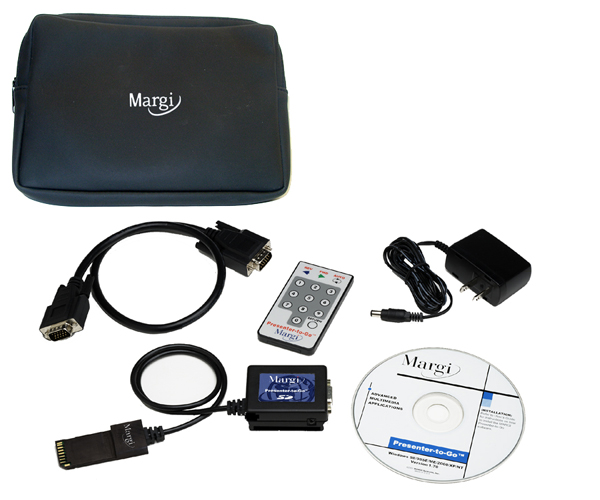
I will be getting a Treo 650 in 2 weeks time,  I already have a personal 600,  but this one will be provided by my company and will have wireless email, calendar and address book.  I am really looking forward to it.  I will also get to play with a Margi presenter-to-go kit, which should be fun,  I have never been convinced of the benefits of presenting from a PDA, but it will be interesting to experiment.

One of the reasons I have always liked wireless email is that I always forget to sync my PDA’s, the only one that was ever up to date was my Backberry and it was never in its cradle and the only time it synced to the PC was during a SW upgrade.

Great utilities site

I recently refreshed my utilities by browsing through Scott’s great site strongly recommened.  These are the ones I use:

  • Notepad2 (Scite also uses the codebase) – A great text editor. First class CR/LF support, ANSI to Unicode switching, whitespace and line ending graphics and Mouse Wheel Zooming. A must. Here’s how to completely replace notepad.exe. Personally I renamed Notepad2.exe to “n.exe” which saves me a few dozen “otepad”s a day. Here’s how to have Notepad2 be your View Source Editor. Here’s how to add Notepad2 to the Explorer context menu.
  • Windows Desktop Search – The betas were rough and tended to lock up, but the free final edition is tight. I can finally bring up a file almost as fast as I can think about it. One important note that sets it apart from Google Desktop Search is that the items appearing in the result window are first-class Explorer Items. Right click on them and you’ll not only have all your context menu extensions, but also Open Containing Folder.
  • TaskSwitchXP and/or TopDesk – Two better ways to ALT-Tab and Task Switch in Windows. Don’t confuse TaskSwitchXP with the old PowerToy. This one is fast and powerful. …

War rooms increase productivity

FlexibleofficeSome of the best years of my working life were spent in an office environment I designed to promote collaborative work.  It had many of the characteristics of a “war room”.  With quiet areas around the sides, tables in the middle and loads of break-out areas, white-boards, flip charts and a design review/presentation area.  I described this environment in a previous post.  I have generally been frustrated at the lack of discussion about workspace design in the IT press, so I was pleased to come across this article that resonated strongly with my experience:

Recently, many companies in the software industry have been experimenting with putting teams of workers into “war rooms” to enhance communication and promote intense collaboration, explains Stephanie Teasley, an assistant research scientist in the U-M School of Information’s Collaboratory for Research on Electronic Work.

Instead of toiling in separate cubicles, workers sit at wall-less workstations in one big, open room. The room is typically outfitted with central worktables, whiteboards and flip charts to facilitate group discussions. While companies expect benefits from such arrangements, workers sometimes balk at the idea, fearing they’ll sacrifice privacy and the quiet they need to concentrate on demanding tasks. The U-M …

Microsoft Virtual Earth and integration

Msn_veThis video shows some great integration between different information sources:

  • Satellite imagery
  • Low flying aircraft imagery
  • Vector mapping data
  • Local “yellow pages” type information

You can take this integrated data and share it as:

  • Directions
  • Blog posts to MSN Spaces

And they implied that a Win32/.net client is under development and you can image the sort of integration that that will have with GPS, Outlook etc.

Of course google maps has some similar features, what’s will be interesting about Virtual Earth is the integration and the thick client possibilities.